
Pull up a chair. Someone's in trouble.
Watch a table in the lounge or a live dungeon run, join the spectators' chat, and keep several games open while you wander around the clubhouse.
Some evenings you want to brave the dungeon yourself. Other evenings, watching somebody else make a questionable decision will do nicely.
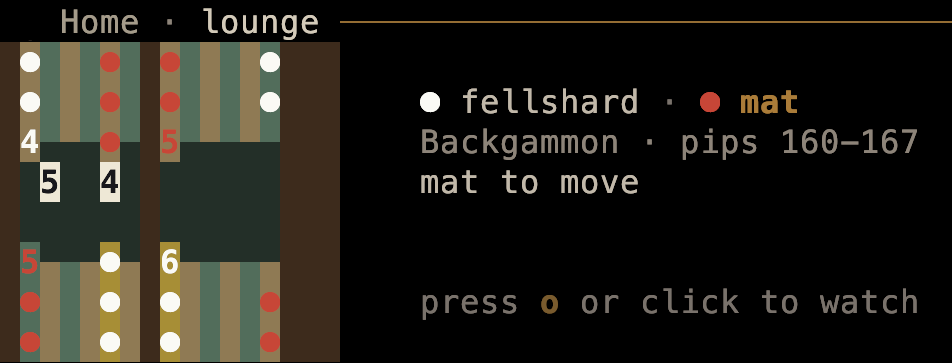
Sometimes the invitation is right on Home: a lounge game preview shows the players, the board, and whose turn it is. For the Backgammon table pictured above, press o or click to watch.
late.sh now has spectating for Dungeon Crawl Stone Soup, NetHack, and Brogue. Open Games (3) and look beneath the game list for live. Select a running game to preview it, then press Enter to open the watch. When nobody is playing, the list says so.
You're watching the player's actual terminal game. Beside it, when there's room, sits a watcher chat: press i to join the conversation. The player can see that chat too, or hide it from their own view. Your commentary belongs in the chat; your keys don't steer their character.
You can keep several watches open. Press backtick (`) to hop through them and your other open workspaces, including Home. A watch closes when you leave it with Esc, the game ends, or it has been off screen for ten minutes. If you've selected a chat message, Esc clears that selection first.
The Live panel in the sidebar offers another way in: click a game, or use its displayed s-then-number shortcut from Home. Watcher counts make it easier to spot a little gathering.
A dungeon run can be a social occasion, even if you're safely on the other side of the screen.
Sources: DCSS spectating, NetHack and Brogue, and the current watch controls. Merged October 7–9; checked October 13. The live Games list was checked without an active dungeon run; Mike's screenshot shows the lounge's separate Backgammon preview.